There is a list of words and phrases in the theme that can be translated into different languages.
You can translate them with different tools:
Utouch comes with a translation file utouch.pot that include translatable strings for the theme. It is located in wp-content/themes/utouch/languages/ folder.
1. Install POedit on your computer http://poedit.net/ .
2. Open utouch.pot file in it (located in wp-content/themes/utouch/languages/)
3. Begin translating all or some phrases into your language.
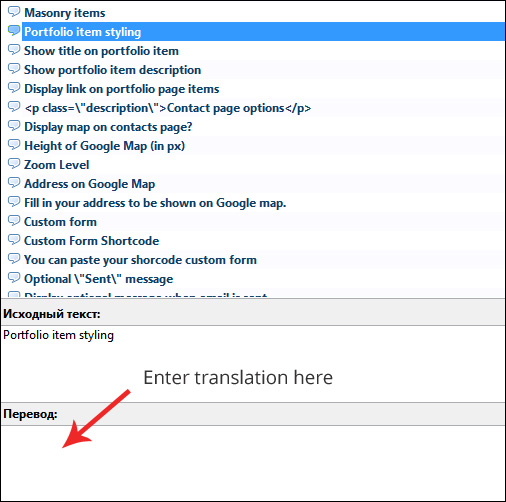
4. When all phrases are translated, save the file in the following format {theme_domain}-{ru_RU/en_GB}.{mo|po} .
5. After the .PO file is saved, a .MO file is created automatically.
6. Upload both files (.PO and .MO) via your FTP account into wp-content/languages/themes/ folder.
Translation will be applied automatically, if you have installed WordPress in corresponding language.
NOTE: It is highly recommended to save a copy of your .PO file on your computer location.