WordPress 5.0 version
This release contains a major change to the WordPress editor - called Gutenberg. It uses a new block-based system for editing.
However, in most cases, it is entirely possible that some plugins and themes may not be initially compatible with Gutenberg, because it has been integrated with an extremely low rate to WordPress: https://wordpress.org/plugins/gutenberg/ and as a result, it may cause different issues, especially with KingComposer.
But don’t panic – if you don’t want to use the Gutenberg Editor or it causes some problems with KingComposer, you need to install the Classic Editor plugin
In order to install the plugin, just do these easy steps:
1. Click on Plugins->Add new
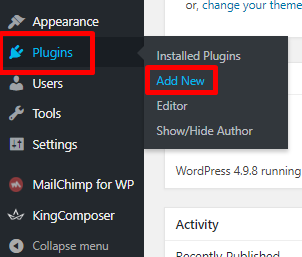
2. Type the "Classic Editor" in the search field, install and activate the plugin

After installing the Classic editor you are able to edit pages and posts in a previous way.