The main change of this update is modernization and improvement of the project aiming to facilitate and automate the development process. In addition, a number of works have been carried out to improve the project as such.
Main changes of the current update are:
Migration to the current version of Bootstrap-4.0.0-beta 2 was carried out by updating/replacing all Bootstrap files.
As before, all changes (in variables and their values) were entered into a separate file Bootstrap/scss/_custom.scss, as well as app/sass/theme-styles/ _bootstrap-customization.scss (styles for standard elements forms, lists, paragraphs, lists, etc.). It should be noted that after installing Bootstrap-4.0.0-beta 2 the file Bootstrap/scss/_custom.scss is not enabled by default in the files, that are intended for the correct compilation of "scss":
app/bootstrap/scss/bootstrap.scss
app/bootstrap/scss/bootstrap-grid.scss
app/bootstrap/scss/bootstrap-reboot.scss
Bootstrap/scss/_custom.scss file specifies custom variables and their values required to implement template design. Therefore, after installing Bootstrap, you must connect it in the above files AFTER !!! the file Bootstrap/scss/_variables.scss:
@import "variables";
@import "custom";
The most extensive changes were made to the GULP streaming build system, its settings, and the used plugins-modules, with help of which Olympus is built.
It was decided to divide projects into 2 branches to organize and optimize development process. The first and main branch (..src/) is used directly for developing and editing the project. The second one (..app/) summarizes result of the first branch.
General project structure
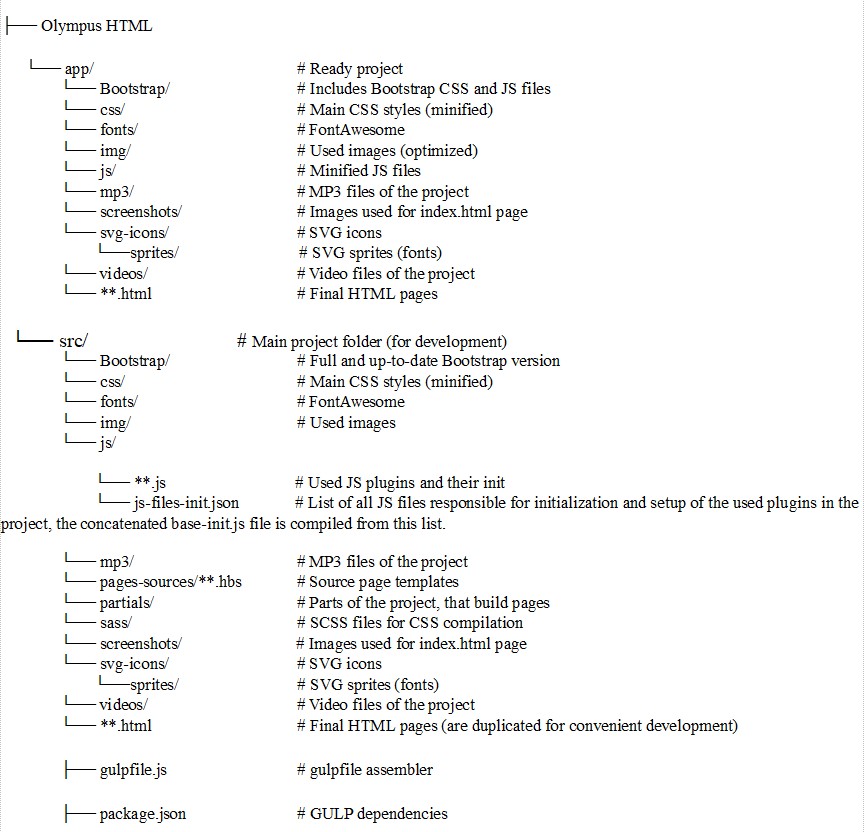
It was decided to split template pages into partials for convenient editing, scaling and developing. Thus we came up with a decision to apply gulp-compile-handlebars plugin for GULP - https://www.npmjs.com/package/gulp-handlebars
More information about it will be highlighted in the "Working with GULP" section.
For CSS files minimization we used gulp-cssmin plugin https://www.npmjs.com/package/gulp-cssmin
As for compilation of SCSS into CSS, we created ..src/sass/main.scss file, in which we listed all required SCSS files in correct order to be compiled into main.min.css file. You get this file in the process of project building already with vendor prefixes and in minified state. This process is described in more details in the "Working with GULP" section.
For JS files minimization and concatenation the following plugins were used:
gulp-concat - https://www.npmjs.com/package/gulp-concat (объединение файлов);
gulp-uglify — https://www.npmjs.com/package/gulp-uglify.
Concatenation: ..src/js/js-files-init.json file includes all JS files responsible for initialization and setup of the used plugins in the project. It also serves as source for compiling the concatenated base-init.js file.
Often clients' appeals to our support help desk and testing of the template on different browsers pointed out the necessity of CSS vendor prefixes usage. Our choice fell on the gulp-autoprefixer plugin– https://www.npmjs.com/package/gulp-autoprefixer for implementation of this task. It adds vendor prefixes to all required CSS properties automatically. Setup of this plugin is highlighted in "Working with GULP" section.
We won't repeat how important page load time and content optimization are. We'll just say that we used gulp-imagemin plugin – https://www.npmjs.com/package/gulp-imagemin for optimizing and compressing images in the project. It takes all graphic files, located in ..src/img/* and in ..src/screenshots/* folders, optimizes and minifies them, and records the result into ..app/img/* and ..app/screenshots/* folders accordingly.
For SVG icons optimization we used gulp-svgmin plugin - https://www.npmjs.com/package/gulp-svgmin. It takes SVG icons from ..src/svg-icons/*.svg, carries out optimization work (deleting Doctype, Comments etc.), and records results into ..app/svg-icons/*.svg.
In order to eliminate HTML code validation errors while development process. we engaged htmlhint plugin - https://www.npmjs.com/package/gulp-htmlhint.
Its examples with colored variations are represented on ..app/00-Typography.html page.